SmartCue

Changelog

What's new in SmartCue, newest first. Press Play on an update to try it.

Subscribe with RSS
  • Improved
  • Fixed

Smaller improvements and fixes

  • Replace picture now warns you when a picture is small enough to look soft on large screens.
  • When a showcase can't load, viewers now see a message with a Reload button instead of a blank page.
  • Fixed: for a few days, text typed into a highlight's description could save onto the intro instead.
  • Fixed: with autoplay on, a narrated step could move on before its narration finished.
  • Fixed: AI voiceover skipped some highlights, including ones added by bulk import. If voiceover is on for your showcase, publish it again to narrate them (the new narration uses AI credits).
  • Fixed: duplicating a showcase left out your unpublished edits.
  • Fixed: guests saw an Edit in Builder button they couldn't use.
  • New

Frame phone and tall screenshots on a background

Phone screenshots used to shrink your whole showcase to a narrow strip, with the text box sitting right on top of the screen it was describing.

Turn on Fit & background (Showcase Settings › Fit & background) and your showcase stays one size from start to finish. Tall and small screenshots sit on a background: soft gray, a pale tint of your theme color, or dark. When there's room, the text moves beside the screenshot instead of covering it.

Wide screenshots don't change, and it stays off until you turn it on. Viewers on phones, in small embeds and in downloads still get the classic layout.

Read the guide

  • New

Give each chapter its own picture or color

Chapters used to show whatever picture came next. Now you choose: upload a picture, or use a plain background in white, light gray, your theme color or any color you like.

Select a chapter and click Chapter picture. If your showcase has more than one chapter, check "Use this on every chapter" for one consistent look.

Read the guide

  • New

Put several screens side by side in one step

Some steps are really two screens: tap here, and this opens. Now you can combine 2 to 4 screenshots into one highlight, side by side, in the order you choose.

Select the highlight, click Combine screenshots (next to Replace picture), pick your screenshots and click Combine. The hotspot stays on the same spot of its own screenshot, and the message that pops up lets you undo it straight away.

For a sharp result, combine the original screenshots rather than screenshots of screenshots.

Read the guide

  • New

See which showcases people are watching

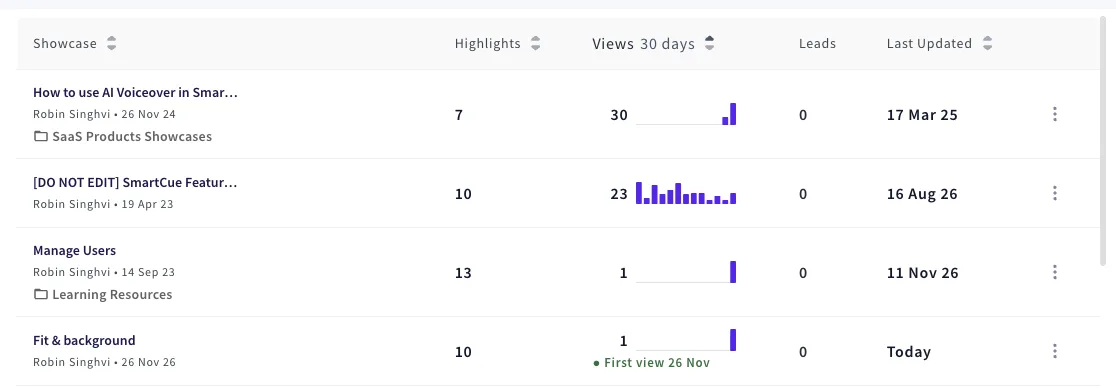
Your showcase list now has a views column: each showcase's views over the last 30 days, with a small 13-week chart beside it. A short note appears when something changes, like a first view, views stopping or a sharp drop.

Open any showcase and go to Performance to see where people opened it, how far they got and how many finished. Share summary emails you a one-page report you can forward.

One thing to know: since November 15, a view is one visit in one browser tab. If your numbers dipped that week, the counting changed, not your traffic.

SmartCue's showcase list with a Views 30 days column and a small chart beside each showcase.

Read the guide

  • New

Add a whole folder of screenshots at once

Building a showcase used to mean adding screenshots a few at a time. Now you can drag up to 100 (JPG, PNG or WEBP, up to 5 MB each), or a whole folder, into the editor. Each one becomes a highlight, in file-name order, so number your files 1, 2, 3 to control it.

Then place the hotspots: the import walks you through them one by one. Anything that couldn't be added is listed with the reason, and Undo import takes the whole batch back.

Read the guide

  • New
  • Alpha

Build a showcase by asking Claude Code or Codex

If your team uses Claude Code or Codex, you can now give it a folder of screenshots and ask for a showcase. It writes the titles, descriptions and voiceover scripts, places the clickable hotspots, and saves it as a draft in your workspace. Nothing goes live until you've checked a preview and told it to publish.

It's an alpha, on request: workspaces on a paid subscription can ask from the banner above the showcase list or in Settings › AI agents, and we switch it on.

Read the guide

Looking for older updates? The 2023 and 2024 roundups are on the archive.