By Robin Singhvi · Founder, SmartCue · Updated April 29, 2026
Most teams I talk to have a content-debt backlog and a demo-output bottleneck at the same time. They built one demo for the website, then built a different demo for sales, then sat down to write a blog walkthrough and rebuilt the whole thing again because nobody captured the original cleanly. By month four they have three demos that say almost the same thing, none of which can be cut into a GIF, and a content calendar with eight slots and nothing to put in them.
This is the wrong way around. The bottleneck isn't demo production. It's that demos get built as one-offs instead of as source material.
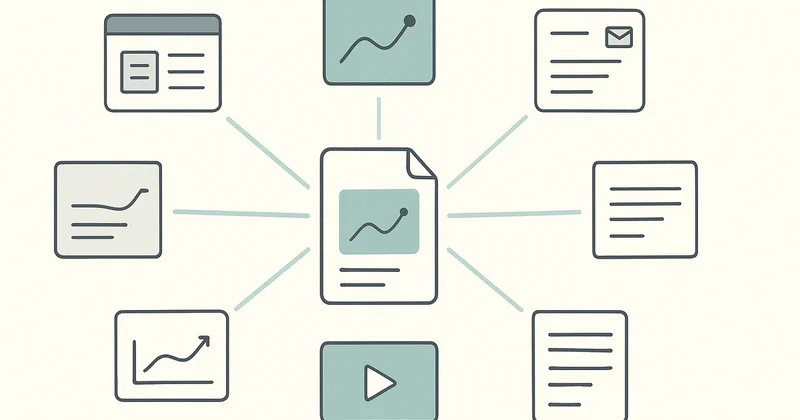
Here is the defended thesis for this post: repurposing demos isn't a content-marketing tactic — it's the operating model that makes one demo pay for the time to build five. The teams that get demo ROI are the ones with a multi-output workflow built into capture. The teams that don't repurpose end up with one demo per channel and a content-debt backlog. Repurposing is the multiplier, not the bonus.
I have watched this play out across 4,000+ teams on SmartCue and nearly 10,000 published demos. The pattern is consistent: the teams that treat one source demo as the input to five downstream artifacts ship more content per hour of capture than the teams that don't, and they do it with less drift between channels because the source-of-truth is one file, not five.
Why most teams build one demo per channel
The "one demo per channel" failure mode looks reasonable from inside the team. Marketing wants a website hero. Sales wants a follow-up asset. CS wants an onboarding walkthrough. Each function asks for "a demo," and each function gets one. Three demos, three captures, three measurement loops, three things to keep current when the product UI changes.
Three problems compound from there.
First, the source captures drift. The website demo says one thing about the dashboard; the sales demo says a different thing because the AE captured it three weeks later, after a product update. By month six, prospects who see both demos get conflicting messages and you have no version of truth.
Second, none of the captures are reusable as raw material. A demo built for the website hero is timed and edited for an autoplay context — short steps, light captions. That same capture cannot become a 90-second LinkedIn video without re-edit, cannot become a PDF leave-behind without re-shotting screenshots, cannot become a blog walkthrough without re-narrating. Each new artifact requires a fresh capture. Production cost stays linear.
Third, the metric layer is fragmented. If three demos exist for three channels, demo-engagement data lives in three different places. Nobody on the team can answer "did this story land?" because the story is split across three sources that don't reconcile.
The teams I see ship the most demo content per hour are not the teams that hire more PMMs. They are the teams that figured out one source demo can become six artifacts if it is captured with that intent from minute one.
The repurpose-first capture model
The shift is small in description and large in practice: capture once, with the downstream artifacts already on the production sheet.
Before the capturer hits record, the team writes down the answer to one question: which artifacts will this demo become? The standard list at SmartCue customers I have watched run this well is six — PDF leave-behind, GIF for email, video for LinkedIn, blog walkthrough, hub-page embed, sales-email asset. Not every demo produces all six. The point is that the artifact list exists before capture, not after.
Three things change about the capture itself when this list exists upfront.
The capturer slows down. A capture intended for autoplay-only is fast and rough; a capture intended to also become a blog walkthrough has cleaner step boundaries and clearer narration. The extra five minutes at capture saves an hour of re-shooting later.
The step structure gets cleaner. About 12 steps is the median demo length on SmartCue, and the demos that repurpose well are the ones where each step is a coherent unit of meaning — one screenshot, one caption, one idea. Sloppy step boundaries kill repurposing because you cannot extract step 4 as a GIF if step 4 is actually three things mashed together.
The metadata gets recorded. Captures that will become PDFs need step-level captions written for read-not-watch consumption. Captures that will become LinkedIn videos need a 90-second cut decision made upfront. Captures that will become blog walkthroughs need their narration available as text. None of this is hard, but all of it is impossible to retrofit cleanly.
The repurpose-first capture model is the operating change. Everything downstream is mechanical.
Six output artifacts from one source demo
Here is the full multi-output sheet from one capture. All six are derivative of the same source demo. None require a fresh recording.
PDF leave-behind. Export the demo's screenshots and step captions into a branded PDF. Useful for sales follow-up after a meeting where the prospect needs to share the story internally with stakeholders who were not on the call. The PDF is not a replacement for the live demo — it is a carry-along artifact for asynchronous review.
GIF for email. Pick the two or three most visually compelling steps and export them as a short GIF. Drop into a sales outbound email or a marketing nurture sequence. The GIF does not replace the full demo; it earns the click that drives the prospect to the full demo. Cold-email demos usually need to be 30% shorter than website demos in their full form, but the GIF teaser is a different artifact entirely.
Video for LinkedIn. Same source, exported as a 60-90 second video with voiceover. LinkedIn's autoplay rewards short and visual; the video does not need to be the full story, only enough story to drive the click. Personify Health, Creditsafe, OneDigital, and similar enterprise customers I have watched do this run a standing template — same source demo, video edit lands on an exec's LinkedIn the week of feature launch.
Blog walkthrough. Embed the interactive demo inside a long-form blog post that walks through the same flow with surrounding context — the user problem, the alternative approaches, the pricing implications, the implementation footprint. The interactive demo does the work of "show me"; the surrounding text does the work of "tell me why this matters." This is the artifact with the largest SEO upside, because the embedded demo lifts time-on-page substantially relative to a static blog.
Hub-page embed. Drop the demo into the relevant solution page — /solutions/sales, /solutions/marketing, /solutions/customer-success. The hub page already pulls organic traffic; the demo lifts conversion off that traffic from "interested visitor" to "lead." Same source, different surrounding frame.
Sales-email asset. Make the demo's share link the central asset in the AE outbound template. The demo replaces the case-study PDF that nobody opens. AEs at the customers I have watched run this well report that the share-link click-through rate beats their previous PDF asset by a wide margin.
Six artifacts, one source. The marginal cost of artifact two through six is mostly export and edit work measured in tens of minutes, not hours.

How to operationalize
The model is simple to describe. The operationalization is where most teams stall. Five steps make the difference between a one-off attempt and a standing operating mode.
Step 1 — Build the artifact sheet template. A one-page document listing the six artifact types with a checkbox column. Every demo capture starts with this sheet filled in. The sheet lives in the team's shared docs space alongside the workflow doc from the demo automation playbook. No capture starts without the sheet.
Step 2 — Assign the artifact owners. Each artifact has a function-lead owner. PDF leave-behind and sales-email asset belong to sales enablement. Blog walkthrough and hub-page embed belong to PMM. Video for LinkedIn belongs to whichever exec or AE is fronting the launch. GIF for email is shared. The artifact sheet has an "owner" column next to the checkbox column.
Step 3 — Standardize the capture conventions. Step boundaries, caption length, voiceover tone, screenshot resolution. Write these down once. Every capturer follows them. The conventions exist because deviating from them at capture time costs an hour at edit time. Boring is the goal.
Step 4 — Build the export macros. PDF export, GIF export, video export, embed snippet, share link — each artifact has a one-click or one-command path from the source demo. SmartCue handles most of these natively; if your platform does not, build the missing exports as a standing macro before you scale production. The exports being slow is the most common reason teams abandon repurposing in month three.
Step 5 — Measure per artifact, attribute to source. Each artifact has its own engagement metric — PDF opens, email click-through, LinkedIn impressions, blog time-on-page, hub-page conversion, sales-email reply rate. All of them attribute back to the source demo. The dashboard shows source-demo-level ROI, not artifact-level confusion. This is the single biggest lift in the measurement layer the demo automation playbook describes.
The teams I have watched run this well are not the teams with the largest content org. They are the teams that decided early that capture is a multi-output activity and built the conventions to match.

What scaled repurposing looks like in practice
Some grounding from the SmartCue customer base. These are the teams whose multi-output operating models I have watched from the platform side.
Personify Health — global digital health platform, ~3,000 employees, formerly Virgin Pulse — runs over 800 interactive demos with well over 100,000 viewer interactions across the program. The PMM org treats each major feature launch as one source demo with the full six-artifact sheet attached. Sales gets the leave-behind PDF and the sales-email share link the same week the demo lands on the website hero. The blog walkthrough goes live on a two-week lag once the surrounding context is written. The LinkedIn video lands on the launch week from the exec front.
Creditsafe — global credit-data platform, 1,500+ employees across UK / IT / FR / DE / NL / BE — runs over 1,000 demos with 30,000+ viewer interactions. Their model is regional federation: each region runs its own artifact-sheet workflow on top of a shared capture base, so the same source demo becomes localized PDFs and localized email assets without a fresh capture per region.
OneDigital — US benefits services, ~3,000 employees — runs 250+ active demos with sales-led personalization. The artifact that wins for them is the sales-email share link; AEs build outbound around it instead of around case-study PDFs.
The unifying signal across the customers that scale repurposing well: the artifact sheet exists before capture, the artifact owners are named, and the export paths are fast. The customers that try to retrofit repurposing after capture are the ones who give up by month three.
Frequently asked about repurposing demos
Is repurposing the same as content marketing?
No. Content marketing is the function. Repurposing is the operating model inside the function that makes one demo asset pay for the time to build five. A team can have content marketing without repurposing — and most teams do, which is why their content-debt backlog grows faster than their demo throughput.
How many artifacts per source demo is realistic?
Six is the standard sheet. Most demos produce four. The ones that produce all six are usually feature launches with a heavy GTM footprint. The ones that produce two are sales-only or CS-only demos with a narrow channel. The number that matters is "more than one" — anything above one is a repurposing program; one is the failure mode.
Does repurposing require a specific platform?
No. Any interactive demo platform with a clean step model — SmartCue, Walnut, Storylane, Supademo, Navattic — supports the multi-output workflow as long as the platform exposes export paths for the artifact types you need. The platform decision matters; the repurposing operating model matters more. See the SmartCue alternatives roundup if the platform decision is still open.
What about CRM integration?
For HubSpot users, SmartCue syncs lead-capture data from every artifact's share link directly into HubSpot, so demo engagement attaches to existing contact records regardless of which artifact the prospect touched. One CRM, done well, beats five integrated badly. For other CRMs, integration paths vary by vendor.
Does repurposing change the capture time?
Yes — by about 5-10 extra minutes at capture, which buys back roughly an hour at downstream edit time. The math is positive after artifact two. Teams that report capture time exploding are usually overengineering captions or reordering steps that should have been planned upfront.
How do I avoid drift between artifacts?
Single source-of-truth at the source demo. Every artifact links back to the source. When the source updates, the artifacts get re-exported, not rebuilt. The platform should make this trivial; if it does not, drift management becomes the bottleneck and the program stalls.
Where does repurposing fit in the demo automation playbook?
It is the layer that gets serious in Sprint 2 of the 90-day rollout. Sprint 1 ships one demo end-to-end on one channel. Sprint 2 is where the artifact sheet enters the workflow and the team starts producing multi-output from each capture. By Sprint 3, repurposing is the default mode.
What is the security posture for distributed demo artifacts?
SmartCue runs on production-grade cloud infrastructure with TLS 1.2+ encryption in transit and AES-256 encryption at rest, with granular per-org access controls and IP allowlisting available on demo viewing. Full security details at the security page. The artifacts inherit the platform's controls; you are not creating new security surface by exporting them.
Related reading
- Demo Automation Playbook — the 90-day rollout this repurposing model plugs into
- What Is Demo Automation? — the workflow architecture
- 12 Interactive Product Demo Examples — finished examples to study before designing your artifact sheet
- How to Create an Interactive Product Demo — the capture-side walkthrough
- What Is SmartCue? — the platform behind this post
Build your artifact sheet on your next demo — sign up free at app.getsmartcue.com. Or see pricing →.