Consensus alternatives should be compared by the experience your buyer needs: a recorded explanation, a guided product tour or an environment they can explore. Consensus itself offers video demos and interactive product tours, including HTML capture and sandbox tours. A video-versus-interactive shortlist is useful for defining the task, but it is not a reliable way to divide vendors into exclusive camps.
For a defined workflow explained through captured screens, evaluate SmartCue. For a broader product-tour program, consider Navattic. For application cloning and live demo environments, evaluate Reprise. If the main job is recording and sharing a sales video, consider Vidyard. These are starting points for different requirements, not a ranking or a claim that one subscription replaces every Consensus capability.
This guide is published by SmartCue. Product descriptions and price units were checked against official sources on November 12, 2026. The practical evaluation below is a suggested buyer test, not a measured result across the vendors.
What Consensus offers today
Consensus offers on-demand video demos alongside interactive product experiences. Its product page describes HTML capture, video capture and sandbox tours. Its tour guide distinguishes a guided screen-based Dynamic Tour, a guided HTML Dynamic Tour, a Sandbox Tour with multiple paths and a separate Full Simulation experience. Confirm which experience and license your evaluation includes.
That overlap matters. A team leaving Consensus may need a replacement for one guided tour, or for a combination of content, sharing and buyer-engagement reporting. Establish what must survive the move before choosing a smaller tool or a different format.
Sources: Consensus interactive product tours and Consensus's guide to choosing a tour type.
Choose the buyer task before the alternative
Explain a workflow in a prepared sequence
A product marketer may need a prospect to understand how a report gets created and shared. Write the required outcome in one sentence. A guided sequence can show the relevant screens and explain each action without giving the visitor a working application. Check whether the buyer can reach and describe the outcome without coaching.
Let a buyer explore beyond the prepared route
A sales engineer may need to respond when a buyer asks to open a different record, change a filter or take another path. Put that exact action in the evaluation. The word interactive does not establish which actions work, and HTML capture alone does not establish live backend behavior. Request an environment that demonstrates the required scope.
Explain the product in a shareable video
A seller may need to combine narration, a screen recording and a personal introduction. Test that recording and sharing workflow directly. If several stakeholders must watch or forward the content, check what the receiving colleague can open and what engagement the sender can actually see. A view count and an identified buying-committee member are different outputs.
A shortlist of Consensus alternatives by requirement
SmartCue for a captured, guided walkthrough
SmartCue lets a creator capture a workflow, edit its steps and instructions, then share the published walkthrough. Use it when a sequence of screens can explain the buyer's task. The getting-started guide covers live capture with the Chrome extension and uploading an existing screen recording; the sharing guide covers distribution.
With annual billing selected, Essential is $99 per user per year and Growth is $300 per user per year. Check SmartCue's current pricing for the features and limits you need. These are annual per-user prices. They are not monthly plan totals or a like-for-like savings calculation against an enterprise quote.
Acceptance check: have the person who will maintain the demo capture a sanitized workflow, update one instruction and share it with a teammate. If that teammate needs unrestricted exploration or a working application clone, keep that requirement in the sandbox evaluation. The SmartCue proof below demonstrates a guided captured experience.
Navattic for interactive demos and sales sharing
Navattic's current platform includes interactive demos and Launchpad for sales teams sharing demonstrations before and after calls. If both website discovery and seller distribution matter, evaluate those workflows together rather than treating interactive demos as a marketing-only format.
Acceptance check: publish the required buyer path, send it through the channel your sellers use and inspect the resulting engagement record. Ask which package includes the distribution and reporting you need. Source: Navattic's current platform overview.
Reprise for product tours and cloned environments
Reprise describes product tours, live data injection and self-contained application clones. Consider it when the requirement extends beyond a prepared captured path. Define which actions must work and how the environment should reset before comparing that scope with a guided walkthrough.
Acceptance check: ask a presenter to leave the expected route, complete the required action and reset the environment. Confirm the authoring, maintenance and access requirements for the tested package. Source: Reprise's current platform overview.
Vidyard for recording and sharing sales video
Vidyard is an option to evaluate when recording and sharing video is the central job. Replacing that workflow does not automatically replace Consensus tours, sandboxes or stakeholder reporting.
Acceptance check: record the explanation, share it with a colleague and check playback, forwarding and the engagement information available on the proposed plan. Source: Vidyard's product overview.
See what a SmartCue walkthrough demonstrates
Inspect the authoring side:open the full-size SmartCue editor capture. This real, previously published image shows an older interface: ordered steps on the left, a selected welcome screen in the center, and title and description fields on the right.
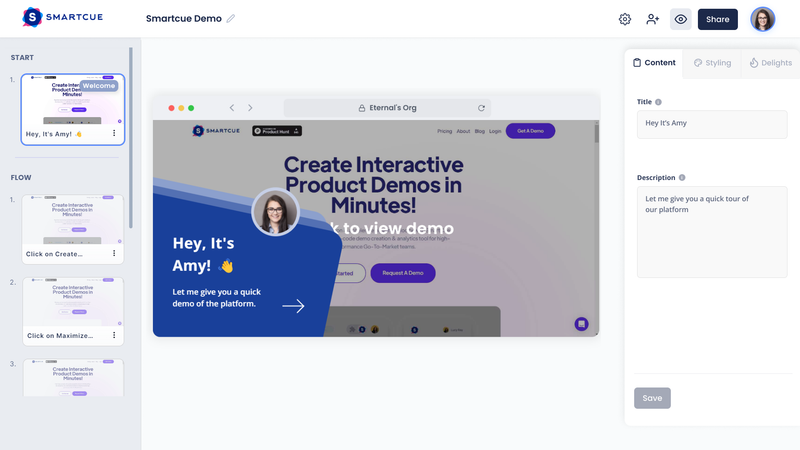
Try the viewing side:open the SmartCue walkthrough. Start with the welcome arrow, then advance a step and observe the captured screen and instruction change together. The editor capture and viewer use different example content; they are not a matched recording. The viewer contains a desktop recording and is best inspected on a larger screen; its small UI text can be difficult to read on a phone.
The relationship is straightforward: the creator orders screens and writes the explanation; the viewer follows that sequence. The editor capture shows authoring and the playable example shows viewing. Neither proves migration from Consensus, HTML capture, a free-form sandbox or application cloning.
Run a replacement test before changing tools
- Inventory what you use. List the demos, video introductions, tours, shared links, embeds and reporting your team actually relies on. Mark required capabilities separately from features you have never used.
- Choose one buyer outcome. For example, a prospect must understand how to create and share a report. Use sanitized sample data and the same intended outcome in each evaluation. Record whether the task needs a guided route, off-path exploration, narration or a combination.
- Test receiving and maintaining it. Ask a teammate to open the published experience on the device buyers use. Make a small product change and have the future owner update the asset. Note any help or extra access needed.
- Check the signals. Identify the exact event and person or account the proposed reporting shows. If the decision requires stakeholder identification or a CRM handoff, demonstrate it rather than accepting a generic analytics checkbox.
- Price the tested scope. Record creator and presenter seats, billing period, usage, required experiences, add-ons and renewal terms. Keep existing links available while you test replacement destinations. Do not assume old links or analytics history will migrate.
Consensus's current pricing page describes per-user licenses and optional usage-based capabilities and tools, and directs buyers to a quote form. It states that integrating the tech stack is free. Use a written quote for your required scope; this guide does not infer an annual contract range or a public entry price. Source: Consensus pricing.
When to keep Consensus, and when to try SmartCue
Keep Consensus on the shortlist when your team needs its combination of video, guided tours, sandbox experiences and buyer signals. If you already use several of those capabilities, replacing only the video recorder or one tour may leave a gap. Run the replacement test against the whole requirement.
Try SmartCue when the immediate job is a clear guided walkthrough that someone can create, maintain and share without a sales-led setup. Start Free Trial and build the single workflow you defined. No credit card. No meeting. No sales call.
Questions about replacing Consensus
Is Consensus only a video-demo platform?
No. Consensus currently offers video demos and interactive product tours, including HTML capture and sandbox tours. Its support guide distinguishes guided tours, sandboxes and Full Simulations. Confirm the license and behavior needed for your use case.
Can SmartCue replace every Consensus capability?
This guide demonstrates SmartCue's captured guided workflow. It does not establish equivalent sandbox, simulation or stakeholder-reporting capabilities. Test the exact requirement before treating a guided tour as a replacement for a broader deployment.
Which Consensus alternative is cheapest?
There is no supported like-for-like ranking here. Price the package that passes your task, including billing period, seats, usage and required capabilities. SmartCue publishes annual per-user prices; Consensus currently asks buyers to request a quote for their scope.