By Robin Singhvi · Founder, SmartCue · Updated April 29, 2026
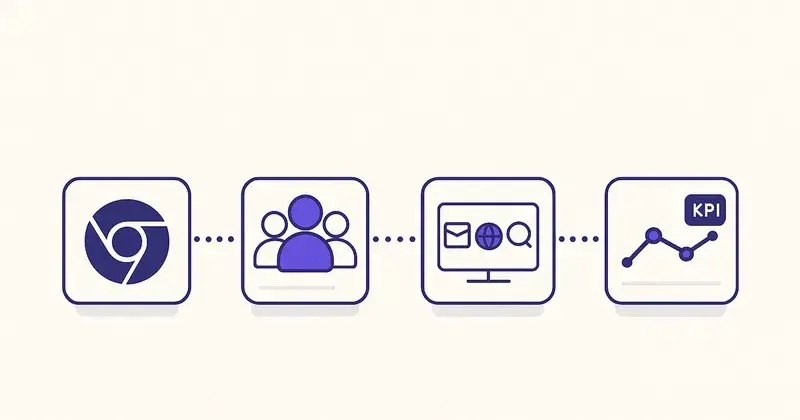
Most teams adopting "demo automation" in 2026 are going to waste money. Not because the category is bad — it isn't — but because they're going to buy a platform without designing the workflow that platform is supposed to support. Six months later, the tool will sit unused, the procurement team will have a horror story, and the next vendor will get blamed.
I've watched this happen often enough to know the failure mode is workflow-first vs. tool-first. Demo automation is a workflow. The interactive demo platform is one node in that workflow. If the workflow isn't designed, the tool can't fix it.
This post is the workflow-first version of "what is demo automation." It defines the term, walks through the four phases of the workflow that actually generates ROI, names which roles own which phases, surfaces the metrics that matter, and only at the end recommends a tool — because that's the right order. The 4,000+ teams running on SmartCue today (Personify Health, Creditsafe, OneDigital, League, Quisitive, Dario Health, and thousands of smaller teams) are doing demo automation well because they designed the workflow first, not because they bought the right platform.
If you're evaluating an interactive demo tool right now, finish this post before you sign anything.
The 30-second definition
Demo automation is the workflow that lets a single GTM contributor — PMM, AE, CSM, or product manager — capture a product walkthrough once, personalize it for multiple audiences, distribute it across owned channels, and measure how it performs against pipeline metrics, without a sales engineer or developer in the loop.
That's it. The "automation" word does work in two places:
- It removes the human-in-the-loop bottleneck for production. Where you used to need a Sales Engineer to record a Loom and a designer to clean it up, you now have a self-serve capture tool that any PMM can use.
- It removes the manual update bottleneck for maintenance. When the product ships a UI change, you update one source-of-truth demo flow, and every personalized variant + every distributed embed gets the new screenshots automatically.
Notice what "demo automation" does NOT mean: it doesn't mean an AI talks at your prospect for you. It doesn't mean the demo runs itself with no human input. It doesn't mean "AI demos." Those are marketing claims attached to specific products in 2025-2026; they're not what the category is.
Why the workflow framing matters
Most B2B SaaS marketing about demo automation goes like this: "Buy this platform → ROI." That framing skips the most important question: what are you actually doing with the platform?
The buyer-journey shift that made demo automation a category in the first place is well-documented. Forrester's B2B buying research tracks that B2B buyers now spend the majority of their evaluation cycle in self-serve mode before they ever speak to a vendor. OpenView's PLG Index shows the same pattern from the product-led-growth lens. Both point to the same conclusion: prospects want to see your product working, in their own time, before any human conversation happens. Demo automation is the workflow that delivers exactly that — when it's designed deliberately.
Here's what happens when teams buy first:
- Month 1: PMM signs up, builds 3 demos for the next product launch, embeds them on the marketing site. Nice.
- Month 3: Sales asks PMM for personalized variants for an enterprise pipeline meeting. PMM is busy. Sales waits two weeks. Sales records a Loom instead.
- Month 6: Product ships a UI change. The 3 launch demos are stale. Nobody updates them. Marketing pages show the old UI for two months.
- Month 9: Renewal review. "How much pipeline did demo automation generate?" Crickets. The tool gets cut.
Versus when teams design the workflow first:
- Week 0: PMM, sales ops, and the GTM lead agree on four things: (1) which audiences need demos, (2) who owns capture, (3) where demos get distributed, (4) which pipeline metric they're measured against.
- Week 2: First demo built against the actual workflow design. Distributed to the channels that were specified in the design.
- Week 6: First measurement check-in. Pipeline metric moves or doesn't. If it moves, double down. If it doesn't, the workflow gets corrected — not the tool.
- Month 12: Renewal review. "Demo automation drove X meetings and Y trial-starts." The platform stays.
Same tool. Different outcome. The difference is the workflow.
The four phases of the demo automation workflow
Every team running demo automation well — and this is corroborated by the patterns in the SmartCue customer base, which I see directly via the product analytics — follows the same four-phase loop. Skip a phase and the workflow breaks.

Phase 1: Capture
Goal: record the product walkthrough once, in a format that can be reused across audiences.
Owner: the person closest to the product. PMM for marketing-led demos. AE for sales follow-up demos. CSM for onboarding demos. Product manager for feature-launch demos.
What "good" looks like: the capture is granular enough that you can reorder steps later, tag specific moments for personalization, and substitute screenshots when the UI changes — without re-recording the whole thing.
The mistake teams make: treating capture like a Loom recording. A Loom is a single linear stream that becomes obsolete the moment a UI element shifts by 3 pixels. Demo automation capture is structured — every step is a discrete unit you can edit, branch, or replace. If you can't edit a single step without re-recording the whole demo, you're not automating; you're just recording.
Phase 2: Personalize
Goal: turn one capture into N variants tuned to specific audiences, without recapturing.
Owner: PMM for messaging variants. Sales ops for persona-routing logic. CSM for onboarding-stage variants.
What "good" looks like: you have at minimum three variants for any demo:
- A persona variant (what does a Director of Marketing see vs. what does a VP of Sales Ops see?)
- A funnel-stage variant (top-of-funnel awareness vs. mid-funnel evaluation vs. bottom-funnel decision)
- A channel variant (the email-embedded version is shorter than the website-embedded version)
The mistake teams make: treating personalization as a future enhancement. Teams ship demos with no personalization in week 1, see meh engagement in week 6, and conclude "demos don't work." Personalization is the workflow's compounding lever — without it, you're shipping a single-channel asset and calling it automation.
Phase 3: Distribute
Goal: get demos into the hands of buyers across every owned channel where they could reasonably encounter your product.
Owner: demand gen for top-of-funnel placement (website, paid landing pages, programmatic). Sales for outbound (cold email, LinkedIn DM, follow-up email). CSM for in-app and onboarding email. Product for feature-launch sequences.
What "good" looks like: every owned channel has a demo placement plan. Website has hero demos. Pricing page has feature demos. Cold email has personalized demo links. Onboarding emails have step-by-step demos. Help docs have task-specific demos. Renewal-stage emails have value-recap demos.
The mistake teams make: distributing only on the marketing website. The website is where prospects go after they're already curious. Sales follow-up email and outbound LinkedIn DMs are where prospects become curious. If your demo only lives on the website, you're missing 70% of the funnel.
Phase 4: Measure
Goal: tie demo behavior to downstream pipeline metrics so you know what's working.
Owner: sales ops or RevOps owns the metric definitions. Each function (PMM, sales, CSM) owns the metric for their use case.
What "good" looks like: four levels of metric, each tied to a decision:
- Reach metrics — demo opens by source. Decision: which channels deserve more investment?
- Engagement metrics — completion rate, median time-on-demo, step-level drop-off. Decision: which demos need editing or splitting?
- Action metrics — CTA clicks, lead-capture form completions, calendar bookings. Decision: which demos convert and which are theater?
- Revenue-proxy metrics — meeting conversion rate after demo touch, trial-start rate after demo touch, opportunity creation rate. Decision: does demo automation justify its budget?
The mistake teams make: measuring reach + engagement, then stopping. Reach + engagement tells you if the demo is being seen. Action + revenue-proxy tells you if the demo is working. Without the second pair, you don't know if you're doing automation or theater.
The bonus discipline almost no team adopts: a stale-content metric. Track the percentage of demos where the underlying product UI has changed since capture but the demo hasn't been updated. If that number creeps above 20%, your prospects are seeing your old product on every channel. The fix is a refresh cadence tied to product release notes — but you can't fix what you don't measure.
What real teams do — corroborated by SmartCue's customer base

I see this workflow play out directly in the SmartCue product analytics. The teams that retain on the platform for 1+ years (600+ orgs across the customer base) are the ones running all four phases. The teams that churn before year 2 are usually missing Phase 4.
Some specific patterns:
Personify Health — the global digital health platform formerly known as Virgin Pulse, ~3,000 employees — runs 800+ demos with well over 100,000 viewer interactions. Their PMM team built distinct persona variants for HR-buyer audiences vs. broker audiences vs. internal enablement. They tie demo engagement back to pipeline meeting rates monthly. Phase 1, 2, 3, and 4 all running. They've been a customer for years.
Creditsafe — the global credit-data company with 1,500+ employees across the UK, Italy, France, Germany, Netherlands, and Belgium — runs 1,000+ demos. Their pattern: each regional sub-org operates demos for its own market, sharing a common capture library but personalizing for local language and use case. Phase 1 (centralized capture) + Phase 2 (regional personalization) + Phase 3 (distribute via local websites and outbound) + Phase 4 (regional pipeline metrics). It works because each region has its own owner per phase.
OneDigital — US benefits services, ~3,000 employees — runs 250+ active demos. Their owner pattern is sales-led: AEs capture and personalize their own demos for cold-email follow-up, with sales ops owning the measurement layer.
League, Quisitive, Dario Health — all running variants of the same four-phase pattern at different scales.
The unifying signal across all of them: someone owned Phase 1, 2, 3, and 4 explicitly before any tool was bought. They didn't figure out demo automation by buying SmartCue; they figured it out, then chose SmartCue.
Demo automation vs. adjacent categories
Worth disambiguating. "Demo automation" is sometimes confused with these neighboring categories:
- Screen recording (Loom, Vimeo Record) — captures video of you talking. No structure, no personalization, no analytics beyond view count. Demo automation is structured + personalizable; screen recording is linear video.
- Product tours / in-app guides (Pendo, Appcues, Chameleon) — guide users inside your product. Demo automation creates demos outside the product, for prospects who haven't signed up yet. Adjacent and complementary; not the same thing.
- Sandbox environments (TestBox, Reprise's enterprise capture) — give prospects a real working version of your product to play with. Demo automation gives prospects a curated walkthrough. Sandboxes are higher-fidelity and higher-effort; demo automation is faster to build and easier to update.
- Pre-recorded sales demos (Vidyard, BombBomb) — async sales videos. No interactivity, no personalization at runtime, no step-level analytics. Demo automation is interactive + personalizable.
If your workflow needs a sandbox, you don't need demo automation; you need a sandbox vendor. If you need async video, same. If you need a structured, interactive, personalizable, measurable walkthrough — that's demo automation.
What to look for in a demo automation platform
Now the tooling conversation makes sense. With the workflow defined, the platform requirements drop out of it directly:
- Phase 1 (Capture): Does it capture step-by-step (good) or as linear video (bad)? Can a non-developer use it?
- Phase 2 (Personalize): Does it support persona variants? Funnel-stage variants? Channel variants? Without re-capturing the source flow?
- Phase 3 (Distribute): Sharable links, HTML embed, email-friendly export formats (PDF/GIF/video), CRM integration for routing?
- Phase 4 (Measure): Per-step analytics? Lead-capture gates? CRM sync for tying back to pipeline metrics? Aggregated dashboards?
Plus the meta-criteria the platform should make easy:
- Updates — when the product UI changes, does the platform let you update one source flow that propagates to every variant + every distributed embed?
- Pricing — is it self-serve and per-seat, or sales-gated and custom? (Self-serve scales with team size; sales-gated scales with budget cycles.)
- Operating model — is it built for a single GTM contributor to operate end-to-end, or does it require a dedicated demo-ops headcount?
For a side-by-side comparison of the major platforms against these criteria, see the SmartCue alternatives roundup or the demo platform pricing index. Both update regularly.
The honest disclosure
I built SmartCue. So when I say "SmartCue handles all four phases for self-serve buyers," that's a vendor-of-record opinion, not an unbiased recommendation. The thing I can say with no bias: the workflow framing in this post applies to every demo automation vendor in the category, not just SmartCue. If you read this and decide Walnut, Supademo, Navattic, Storylane, Reprise, or someone else fits your workflow better, that's the right call.
The wrong call is: skipping the workflow design, buying any platform, and hoping the tool figures it out. That's how demo automation gets a bad reputation — and that reputation isn't the tool's fault.
How to roll this out
If you're starting from zero, the operational sequence is:
- Week 0 — design the workflow on paper. Write out the four phases. Name an owner per phase. Pick the pipeline metric you'll measure against.
- Week 1 — pilot one demo. End-to-end through all four phases. Real audience, real distribution, real measurement.
- Week 4 — first measurement check-in. Did the metric move? If yes, scale. If no, fix the workflow before scaling.
- Week 12 — operational review. How many demos shipped? How many channels covered? Which phase is the bottleneck?
- Quarter 2 onward — formalize the workflow as a repeatable process. Document who owns what. Build the dashboard that drives quarterly decisions.
For a deeper rollout sequence with role definitions, KPIs, and a 90-day plan, see the Demo Automation Playbook. It picks up where this post stops.
Frequently asked about demo automation
What is demo automation?
A workflow that lets a GTM contributor capture a product walkthrough once, personalize it for multiple audiences, distribute it across owned channels, and measure how it performs against pipeline metrics — without a sales engineer or developer in the loop.
Is demo automation the same as interactive demos?
Interactive demos are the output. Demo automation is the workflow that produces them. You can have interactive demos without demo automation (one-off Loom recordings styled as walkthroughs), and you can have demo automation that produces non-interactive outputs (linked PDF exports). Most teams want interactive demos as the output of a demo automation workflow.
Who owns demo automation in a typical SaaS team?
It depends on the maturity stage. At early-stage startups, PMM owns it end-to-end. At mid-market companies, PMM owns capture and personalization while sales ops owns measurement. At enterprise companies, you'll often see a dedicated demo-ops or sales-engineering team operating the workflow on behalf of the sales org.
How long does demo automation take to roll out?
Workflow design is 1-2 weeks. First demo end-to-end is week 4 if you're disciplined. Operational maturity (a stable cadence of 5+ demos shipped per month with measurement feedback) is typically week 12-16.
What's the ROI of demo automation?
It's measured in pipeline metrics, not vanity metrics. The teams that get clear ROI tie demo engagement to downstream meeting conversion rates, trial-start rates, or opportunity creation rates. Without the downstream tie, you'll see good engagement metrics and no business case.
Do I need engineering help to roll out demo automation?
Not for capture or personalization — modern platforms are no-code for those. You'll need light engineering for distribution if you want to embed demos in the product itself or sync lead-capture data into a custom CRM. For HubSpot users, no engineering required.
How is demo automation different from product tours?
Product tours run inside your product, guiding existing users through features. Demo automation runs outside your product, showing prospects what the product does before they sign up. Adjacent categories; complementary; different buyers and different workflows.
What does SmartCue do for demo automation?
SmartCue is the interactive demo platform built for self-serve teams running this workflow. Capture via Chrome extension, no-code editor, persona-based personalization, HubSpot integration for lead sync, full step-level analytics. Plans start at $99/user/year. See What Is SmartCue? for the full product explainer.
Related reading
- What Is SmartCue? — the product behind this post
- What is an interactive demo? — the output category
- Demo Automation Playbook — the 90-day rollout
- How to create an interactive product demo — Phase 1 walkthrough
- 12 Interactive Product Demo Examples — what good demos actually look like
- SmartCue alternatives compared — the vendor matrix
Build your first demo on the workflow above in 6 minutes — no sales call, no credit card, no waiting on me. Start free → or see pricing →.