Choose Storylane or Walnut by the demo your buyer needs and the plan that actually includes it. Storylane offers screenshot and video demos on Free and Starter, with HTML demos from Growth. Walnut offers guided demos on Ignite; sandbox demos are an Ignite add-on and are included in Accelerate. A guided tour and an explorable sandbox answer different buyer questions, so test the required interaction before comparing prices.
SmartCue is another option for explaining a defined workflow through captured screens and instructions. This comparison is published by SmartCue. Vendor facts below were checked against official pages on November 11, 2026. The evaluation is a suggested test, not a measured ranking of the three products.
Storylane vs Walnut: decide what the buyer must do
A product marketer embedding a feature explanation needs a different demonstration from a sales engineer answering unexpected questions during a call. Write down one outcome and one interaction that must work.
- Follow a prepared path. Can a prospect understand a report-export workflow by advancing through screens and prompts without a presenter?
- Explore beyond the path. Must they open another record, change a filter or try a different action? Test that exact behavior in the proposed environment; a clickable tour alone does not establish it.
- Choose among demonstrations. If the buyer needs several workflows or supporting resources, evaluate how they find the right one in a playlist or hub. Confirm that the chosen plan includes that organization.
Keep these requirements separate. HTML editing is a capture and customization capability; it does not by itself prove that every action in a live application will work in the demo.
Compare formats, plans and price units
Storylane: screenshot and video entry plans, then HTML demos
Storylane's Demo Suite Free plan lists one seat and one published demo, using screenshot or video capture. Starter also uses screenshot and video. Growth adds HTML demos. The plans table lists Hubs as a Growth add-on and includes them in Premium.
With yearly billing selected, Starter is $40 per month for one seat, Growth is $500 per month for five seats, and Premium is $1,200 per month for ten seats. With monthly billing, those plan prices are $50, $625 and $1,500 per month respectively. These are plan totals with the stated seats, not prices for each seat.
If you need a sandbox, confirm availability for your chosen plan directly with Storylane. Its plans table lists a Premium add-on and Enterprise inclusion, while its sandbox product FAQ says Growth or above. That difference needs clarification before you budget for the feature.
Sources: Storylane's current Demo Suite plans and Storylane's sandbox description and FAQ.
Walnut: guided demos, with sandbox scope to confirm
Walnut Ignite includes guided demos and Playlists, with three Editor and three Presenter seats, at $575 per month billed annually. Accelerate includes six Editor and six Presenter seats at $1,550 per month billed annually. Scale has custom pricing. Walnut lists a free trial on each plan; confirm the trial's scope and limits for your evaluation.
The feature table lists sandbox demos as an Ignite add-on and includes them in Accelerate and Scale. Ask which package and add-ons cover the exact interactions your buyer needs, then test those interactions. Also count the people building demos separately from those presenting them.
Source: Walnut's current pricing and feature table.
SmartCue: a screenshot-based guided workflow
SmartCue uses captured screens and instructions to explain a defined workflow. Essential is $99 per user per year and Growth is $300 per user per year with annual billing. Inspect SmartCue's current plans for the features and limits you need. This is a different price unit and potentially a different scope from the Storylane and Walnut packages above; it is not a like-for-like savings calculation.
Use SmartCue's trial to test capture, editing and sharing for your own workflow. If your buyer must explore outside the captured sequence, keep that requirement in the sandbox evaluation.
See the captured workflow before choosing
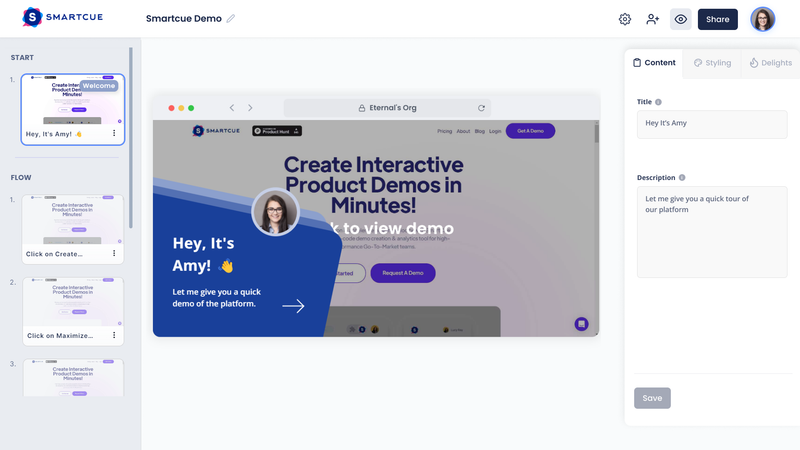
Inspect the editor:open the full-size SmartCue editor capture. This real, previously published image shows an older interface: ordered steps on the left, a selected welcome screen in the center, and its title and description fields on the right.
Try the published viewer:open the SmartCue walkthrough, use the welcome arrow to start, then advance a step. Watch the captured screen and instruction change together. The capture and viewer contain different example content; they are not a matched editor-to-viewer recording. The viewer's desktop recording is best inspected on a larger screen and can be difficult to read on a phone.
The relationship in plain language: a creator orders captured screens, writes the explanation for each step and shares a sequence that the viewer advances. The editor image shows the authoring side; the walkthrough shows the viewing side. Neither demonstrates an imported Storylane or Walnut demo or an explorable application clone.
Run a small evaluation your team can maintain
- Capture one sanitized workflow. Use the same buyer task in each shortlisted tool. Decide whether a prepared route is sufficient or whether an off-path action must also work.
- Make one realistic update. Replace a screen or change an instruction after a product change. Have the person who will maintain the demo do the work and note where help is needed.
- Share without coaching. Ask a teammate to follow the published experience on the device your buyers use. Check whether they reach the intended outcome, understand the next step and can perform any required off-path action.
- Price the tested scope. Record billing period, creator and presenter seats, required formats, add-ons and support. Compare the actual first-year and renewal terms rather than converting unlike packages into a savings percentage.
If a captured sequence covers the job, Start Free Trial and build that workflow in SmartCue. No credit card. No meeting. No sales call. Use the getting-started guide and sharing guide for the current process.
Questions to settle before buying
Is Storylane better than Walnut?
The answer depends on the workflow and package. Compare screenshot or HTML capture, the required sandbox behavior, organization of multiple demos and the people who will maintain and present them. The test above gives your team observable results instead of an unsupported review-score ranking.
Can I try Storylane or Walnut for free?
Storylane lists a Free plan with one seat and one published screenshot or video demo. Walnut lists free trials on its plans. Verify the features and limits of the specific evaluation before assuming it covers a paid requirement. SmartCue offers a self-serve free trial.
Does SmartCue offer the same HTML demos and sandboxes?
This comparison demonstrates SmartCue's screenshot-based guided experience. It does not establish HTML capture or application-cloning support. If those capabilities are essential, evaluate the relevant Storylane or Walnut package and test the actions you need.