Demostack and Walnut both support more than a fixed product tour. Demostack emphasizes cloned product environments and interactive sandboxes. Walnut offers guided demos on Ignite and includes sandbox demos on Accelerate. Choose between them by testing the workflow a buyer must complete, the changes your team must maintain, and the package that covers those requirements.
SmartCue is another option when the job is to explain a defined workflow through captured screens and instructions. This comparison is published by SmartCue. The product descriptions and prices below were checked against the vendors' public pages on November 10, 2026; the suggested evaluation is a test you can run, not a measured comparison of the three products.
Demostack vs Walnut: start with the buyer's task
“Interactive demo” can mean following a prepared path, watching a seller navigate a personalized environment, or exploring a sandbox independently. Write down which experience your buyer needs before comparing feature lists.
- A known path: the buyer needs to see how a feature works, such as opening a report and finding its export option. Test whether the prompts make the sequence understandable without a presenter.
- A flexible conversation: a seller needs to change the data or take a different route during a call. Test an unexpected question using the actual environment you would present.
- Independent exploration: the buyer must try actions beyond the prepared path. Ask them to open another record or change a filter, then check whether the environment responds in a useful way.
These tasks can overlap. A guided tour is not proof that an explorable sandbox is included, and the word “sandbox” does not tell you which actions a particular implementation supports.
What each platform gives you to evaluate
Demostack: cloned environments and product simulations
Demostack describes its cloner as copying a product's frontend and simulating backend responses to create an independent demo environment. Its pricing page describes cloning and personalization, guided tours, live software overlays, analytics and enterprise governance.
Bring a realistic off-path action to the evaluation. Then ask the person who will maintain the demo to update one screen or dataset after a product change. Confirm that both the buyer interaction and the maintenance work fit your team. Demostack does not publish a numeric price on the pricing page reviewed here; request the package and terms for your scenario.
Sources: Demostack pricing and cloner FAQ and Demostack product overview.
Walnut: guided demos, with sandbox access depending on the plan
Walnut's Ignite plan includes guided demos, its demo editor, analytics and integrations. Accelerate adds sandbox demos, among other capabilities. Walnut describes a sandbox as allowing viewers to explore rather than follow only a fixed sequence, so it would be misleading to treat Walnut as a guided-tour-only option.
Test the specific plan you are considering. For a guided demo, check the prompts, sharing and update workflow. If independent exploration matters, test a sandbox and confirm which plan or add-on supplies it. Also check the editor and presenter seat counts against the people who will actually build and deliver demos.
Source: Walnut's current plans and feature comparison.
SmartCue: a captured workflow with instructions to follow
For a feature explanation, website walkthrough or repeatable follow-up, test whether a captured sequence covers the job before buying an environment for broader exploration. In SmartCue, the useful evaluation is to capture a workflow, edit the instructions, share it and watch someone follow the result. This is not a claim that a captured sequence replaces a working application sandbox.
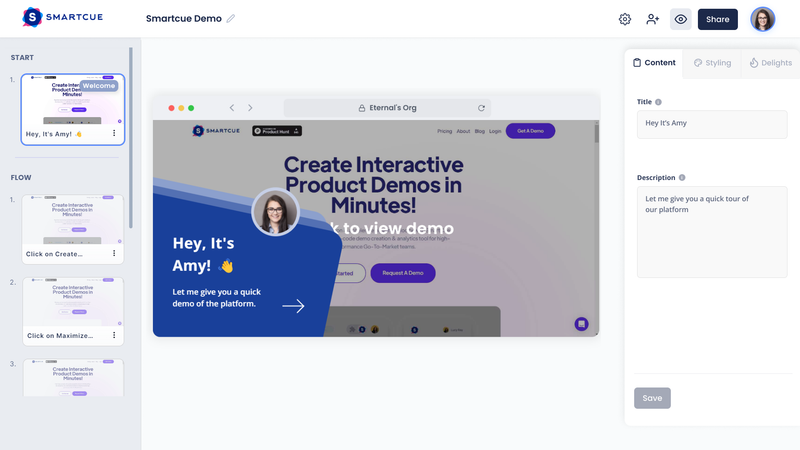
See how the editor becomes a walkthrough:open the full-size SmartCue editor capture. This real, previously published capture shows an older interface: ordered steps on the left, a selected welcome screen in the center, and its title and description fields on the right. The capture and viewer below show different example content; they are not a matched editor-to-viewer recording. Inspect the selected step beside its screen and explanation, then try the published viewer below.
Try the viewer experience:open the published SmartCue walkthrough, use the welcome arrow to start, then advance a step. Notice how the captured screen and instruction change together. This existing example is best inspected on a larger screen; its desktop recording can be difficult to read on a phone.
The same task in plain language: the creator orders captured screens, writes an explanation for each selected step, then shares a sequence that the viewer advances. The capture shows the editor; the walkthrough shows a published viewer. Neither demonstrates an imported Demostack or Walnut environment.
Compare the package, not unlike price units
- Demostack: no numeric price is published on the reviewed pricing page. Ask for the total, included environments, seats, services and renewal terms for your requirements.
- Walnut Ignite: $575 per month, billed annually, with 3 editor and 3 presenter seats. The annualized published amount is $6,900; it is a package price, not a per-user price.
- Walnut Accelerate: $1,550 per month, billed annually, with 6 editor and 6 presenter seats. The annualized published amount is $18,600. Scale has custom pricing.
- SmartCue: Essential is $99 per user per year and Growth is $300 per user per year with annual billing. Check SmartCue's plans for the features and limits you need.
These packages serve different requirements. Do not turn their price difference into a savings claim without establishing equivalent scope. For each option, record who needs to build or present, whether a sandbox is required, which integrations matter, and the first-year and renewal totals. Mark anything unconfirmed as still to be quoted.
Run one workflow through capture, update and sharing
Use the same sanitized workflow in each shortlisted tool. Keep the evaluation small enough that the person responsible for maintaining it can complete it themselves.
- Define the outcome. For example: “A buyer can follow the report-export workflow and explain what they would do next.” If they must explore another report or change a filter, include that action explicitly.
- Build and update. Create the example, then make one realistic product change, such as replacing a screen or changing an instruction. Record which work the intended owner could complete and where help was needed.
- Share and observe. Give a teammate the published experience without coaching. Check the intended route, any required off-path action, the device your audience uses and the next step. Keep a short list of failures rather than a vague “easy to use” score.
If a guided sequence covers the requirement, Start Free Trial and try that workflow in SmartCue. No credit card. No meeting. No sales call. Use the getting-started guide and sharing guide for the current process. If the buyer needs broader exploration, keep that requirement in the sandbox evaluation.
Frequently asked questions
How does Demostack compare with Walnut for demo automation?
Demostack emphasizes cloned product environments and simulations. Walnut offers guided demos and also sandbox demos, with inclusion depending on the plan. Compare the actual buyer task, maintenance workflow, seat mix and quoted scope instead of assuming that one vendor covers every use case better.
Does Walnut support sandbox demos?
Yes. Its public pricing page lists sandbox demos in Accelerate. Confirm the required package and test the actions your buyer needs before purchasing.
Does Demostack start at $55,000 a year?
The Demostack pricing page reviewed on November 10, 2026 does not publish a numeric starting price. This comparison does not use an unsupported dollar estimate; request a quote for your requirements.
When should I evaluate SmartCue alongside them?
When the job is to explain a repeatable workflow using captured screens and instructions. Try the published example, then capture and share one workflow of your own. Use a sandbox evaluation when the buyer must interact beyond that prepared sequence.